

Share this article:
.svg)


.svg)
.svg)

Key Takeaways from this article
- Progress tracking protects the schedule when it turns verified field evidence into decisions within the same reporting period.
- A progress report earns trust by answering four questions consistently: completed work, in-progress work, constraints, and schedule/cost impact.
- Progress control depends on measurable baselines and verified completion, so planned vs actual stays decision-ready.
- Reliable progress control comes from stable rules run with the same cadence across projects.
- The most scalable systems tie work packages to the CPM/Gantt plan and keep field and office teams aligned in real-time so variance shows up early and stays manageable.
On a busy construction site, it’s easy to feel like progress is happening. People everywhere, materials moving, problems getting solved. But activity isn’t the same as construction progress.
What matters is whether you’re advancing compared to the plan, plus progress reporting that points to the next move.
Why Progress Reporting Needs a Fast Feedback Loop
A large meta-analysis found that more frequent progress monitoring improves goal attainment -especially when progress is physically recorded or reported.
On a job site, nobody can run progress from memory. If you can’t see drift early, you can’t correct it in time. And uncorrected drift gets expensive fast.
If this sounds abstract, the numbers make it painfully concrete: an IDC survey commissioned by Procore reported that 75% of owners were over planned budgets and 77% were late, with projects averaging 70 days late. Owners also averaged six budget changes and five schedule changes per project, driving about a 15% increase in project costs.
Construction progress tracking gives project teams a clear and factual view of where a construction project stands, so decisions happen early, not after delays pile up.
Construction Progress Tracking for Better Project Management Decisions
Construction progress tracking is the practice of comparing planned vs. actual progress on a construction project. Timely, accurate updates on the schedule, work completed, and job costs give project managers the visibility they need to make informed decisions while there’s still room to move.
That matters because planning and execution often diverge faster than teams realize.
A performance-driven construction management paper from Construction Management Association of America cites that only about 54% of planned work is achieved weekly in a typical reactive approach - meaning a “busy” construction site can still be off-plan.
In practice, the output of progress tracking is a construction progress report with a defined reporting period (often weekly, sometimes monthly, depending on contract requirements and project scale).
4 Questions Every Construction Progress Report Must Answer
A construction progress report is a structured update that tracks how a construction project is performing against its plan.
The purpose of a construction progress report is to clearly communicate how a project is advancing compared to the plan (typically weekly or monthly, depending on project size and contract requirements).
A decision-ready construction progress report should answer four practical questions:
- What work is completed (verified, not assumed)
- What’s still in progress (active tasks)
- What’s blocking next work (constraints)
- What actual progress means for the construction schedule and job costs
That clarity keeps owners, project leaders, and office teams on the same page and supports more efficient decisions in construction project management.
Progress Tracking Loop That Keeps Project Moving Forward
Construction progress tracking works best as a repeatable loop. The goal is simple: capture reality, compare it to plan, and adjust while the plan is still executable.
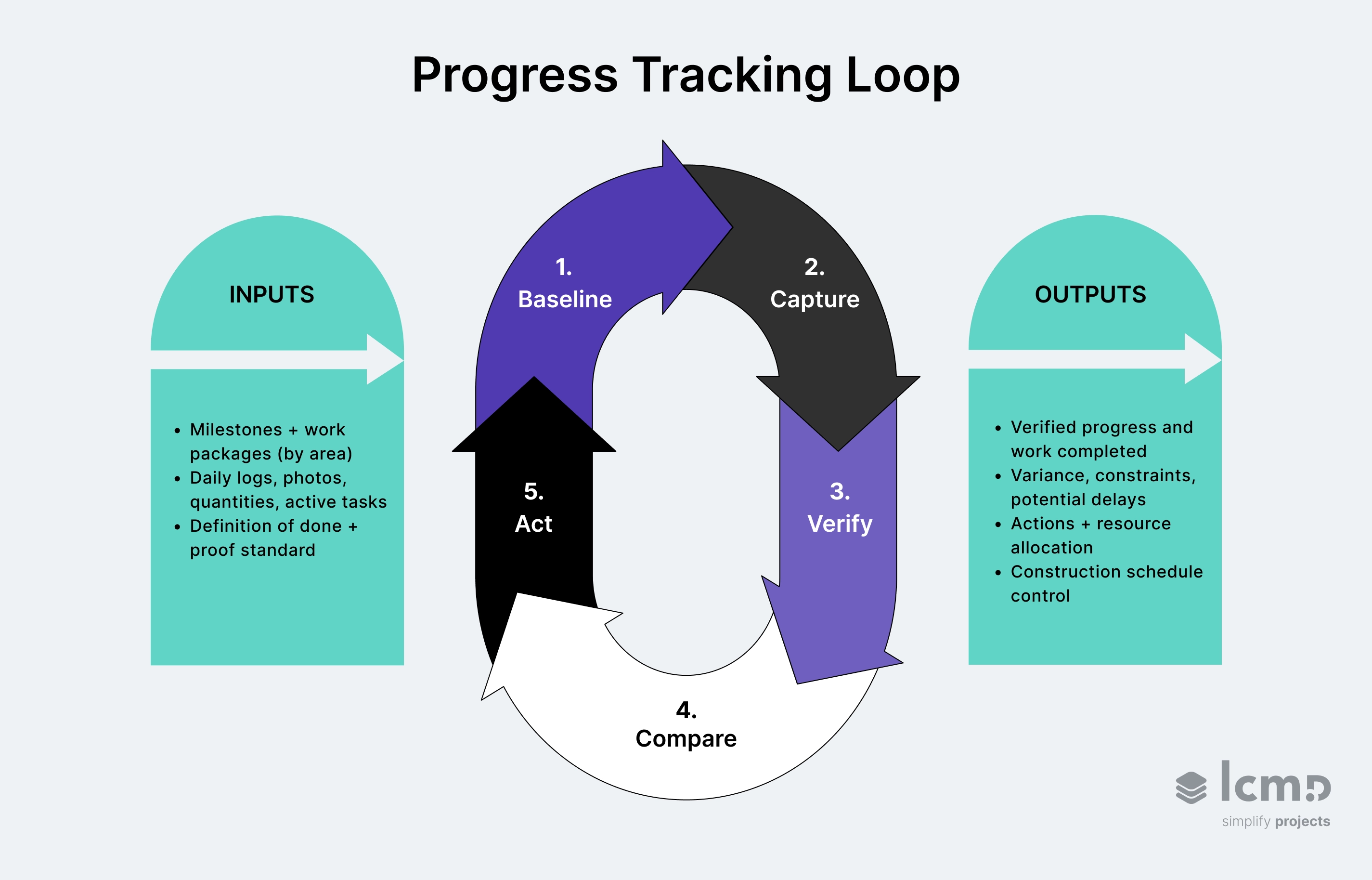
1. Measurable Baseline
Set the baseline so “on track” means something measurable.
Baseline starts with project planning that ties project milestones to the construction schedule and measurable work packages by area. This turns construction project tracking into something that can be repeated across multiple projects without reinventing the format each time.
If the baseline isn’t measurable, you can’t track construction progress, only opinions. A clear baseline also makes tracking progress consistent and helps identify potential delays earlier because drift becomes visible against a defined plan.
2. Job Site Capture Through Daily Logs
Collect project updates in the field, in the same format, every day.
Tracking progress starts on the job site, where the work and site conditions are visible.
Daily logs are a great starting point to understand the work performed each day, capturing information like crew members and site conditions.
Notes, photos, quantities, and active tasks keep everyone on the same page and reduce gaps between field and back office.
3. Actual Progress Verification
Treat actual progress as verified work completed, not “percent complete.”
Verification protects accurate data and helps reduce errors in progress reporting. A simple definition of done per key activity is usually enough, as long as proof is consistent.
Two quick examples:
- Drywall Area A = complete when hung + taped + inspected (photo + checklist).
- MEP rough-in = complete when pressure test passed + tagged (test record + sign-off).
4. Planned vs. Actual Comparison
Compare planned vs. actual progress by area or work package to see where the project stands.
This comparison turns project progress into actionable insights: it helps identify areas that are slipping, reveals constraints, and highlights potential delays before they cascade across trades.
Example:
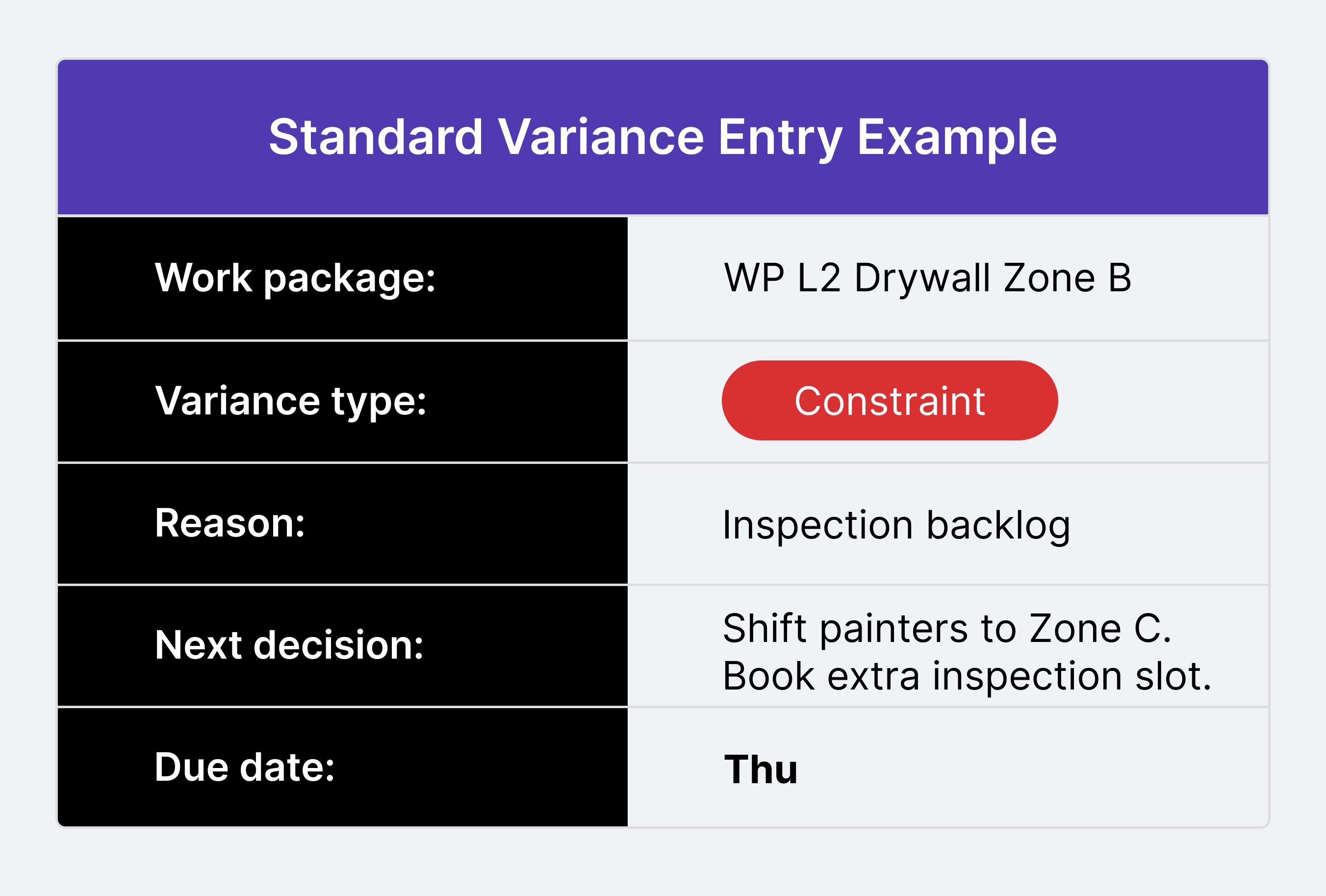
- Planned: 12 Level 2 rooms drywall complete by Friday
- Verified actual: 9 complete (photo + inspection sign-off)
- Constraint: inspection backlog for remaining 3 rooms
- Decision: shift painters to Zone C that’s released + book an extra inspection slot by Thu.
5. Corrective Action and Control
Close the loop fast so constraints get removed and the plan stays executable.
Once variance is clear, actions typically include constraint removal, resequencing handoffs, and resource allocation adjustments. This is where progress reporting improves communication, because responsibilities and next steps are explicit.
When progress tracking is consistent, you also get a clearer view of cost exposure (labor drift, rework risk, remobilization), which supports data driven decisions and more accurate estimates.
Construction Progress Tracking Rules That Reduce Errors
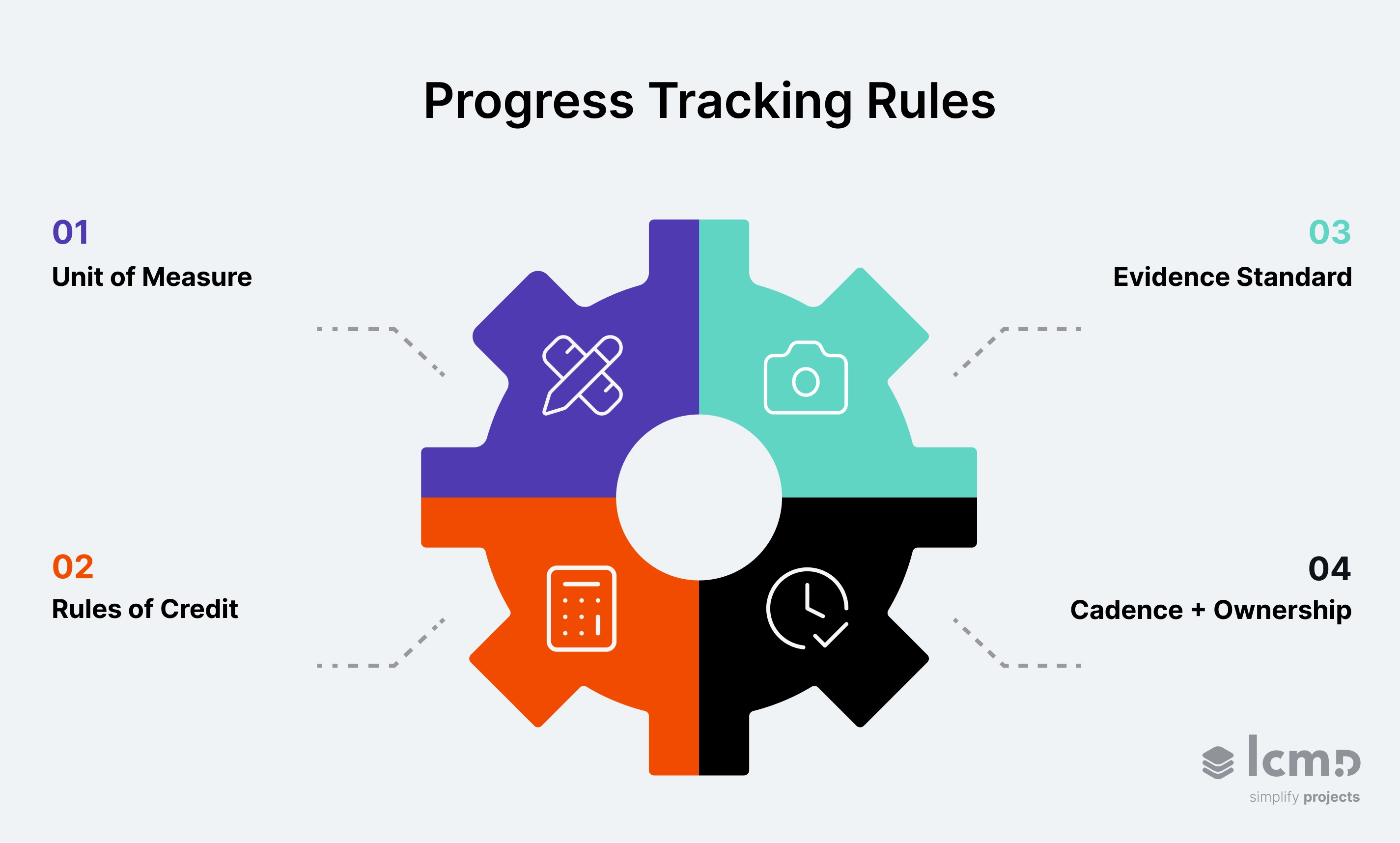
Effective construction progress tracking depends on four simple rules. They protect accurate data, reduce errors, and help project teams make informed decisions.
- Unit of measure: Track work in one unit (recommended: work packages by area) so project information stays comparable across the construction site and across multiple projects.
- Rules of credit: Define how partial completion is counted (e.g., 0/50/100 or weighted steps) so “almost done” doesn’t inflate actual progress.
- Evidence standard: Require proof—photos, checklists, inspections/tests, and sign-off, so work completed is verified, not assumed.
- Cadence + ownership: Project teams capture updates daily, project managers verify weekly, and leadership decides actions in the same reporting period.
When these rules are stable, your progress report becomes more than a status update. It becomes a reliable historical record you can use to improve future projects.
Construction Progress Report Template
A construction progress report template saves time and makes sure you communicate key information accurately.
This template is built around the four rules above. It helps you report progress as verified movement against the plan.
{{asset}}
How to Use This Construction Progress Report Template
This construction progress report template keeps progress reporting decision-ready. Use one cadence and a clear data cut-off so every update reflects the same snapshot.
- Executive summary first: Keep it short. State what changed this reporting period and the impact on schedule and costs. Link every claim to proof (photos, checklists, inspections, sign-offs).
- Verified progress only: Work completed is verified work. Work in progress uses rules of credit, not optimistic “almost done.”
- Look-ahead protects flow: List the next 1–4 weeks of work packages and note prerequisites (access, materials, approvals, inspections). If a prerequisite isn’t secured, capture it as a constraint.
- Make constraints actionable: Every issue, risk, and constraint needs an owner and a “needed by” date inside the same reporting period.
- Track change events separately: Keep it factual. What’s pending, what’s approved, and the expected impact on scope, cost, or schedule.
- Capture quality and safety briefly: One clear summary is enough. It prevents silent rework and reduces surprise stoppages.
- Close with decisions: Write next steps as actions with deadlines. That’s where progress reporting becomes control.
A good template creates a clean snapshot. The real leverage comes from interpreting that snapshot consistently and acting within the same reporting period.
Progress Tracking Response to Variance in Construction Project Management
Variance is the measurable gap between planned progress and verified actual progress for a work package in a given reporting period. Naming the variance type keeps the report decision-ready and protects the construction schedule.
Progress tracking variance can be grouped into four types: evidence, constraint, dependency, and capacity.
Standard variance entry (use for every variance type):
work package + variance type + reason + next decision + due date.
Evidence Variance Needs Proof
Work can look complete in the field and still be unclaimable in the report when proof is missing or rules of credit were applied inconsistently.
Evidence variance is resolved by attaching the agreed evidence standard: photo reference, checklist ID, inspection/test record, and sign-off where required. Until the proof is logged, the item stays incomplete in the reporting period.
Constraint Variance Needs an Owner and a Date
Progress gets blocked by access, inspections, approvals, materials, or missing information.
Constraint variance becomes manageable when every constraint has an owner and a “needed by” date that lands before the next look-ahead window. If clearance will slip, the report must state the expected schedule impact while there is still time to resequence.
Dependency Variance Needs a Sequencing Decision
Some slips threaten handoffs, milestones, or dependencies in the Gantt/CPM plan.
Dependency variance needs a sequencing decision inside the reporting period: what shifts, what stays, and what gets protected. The output is a next-step plan that keeps work packages executable.
Capacity Variance Needs Finish-Focused Output
Scope can be released and clear while output stays below plan.
Capacity variance is corrected by changing how work is packaged and resourced. Splitting into smaller work packages, reducing trade stacking, and rebalancing crews toward finishing restores weekly output and stabilizes flow.
This is where construction software earns its keep, so variance stays traceable from field proof to work package to schedule impact within the reporting period.
Construction Software for Progress Tracking
Construction progress tracking software links planned work to field proof and schedule status.
It cuts manual reconciliation and keeps progress reporting tied to the plan. That closes the gap between what the schedule assumes and what the job site proves, so decisions happen within the same reporting period. When progress tracking also connects schedules, field updates, constraints, and issue data, teams gain a more connected project view for delivery control.
Shared Progress Picture for Informed Decision Making
Real-time data access is essential for effective construction progress tracking, especially when field and back office operations need to stay aligned. If updates arrive late or in different formats, office teams end up reconciling “what’s done” instead of acting on it.
Real-time progress tracking keeps one shared picture of progress across the job site and the office, so progress reporting stays based on accurate data.
Real-Time Tracking to Monitor Progress Against the Schedule
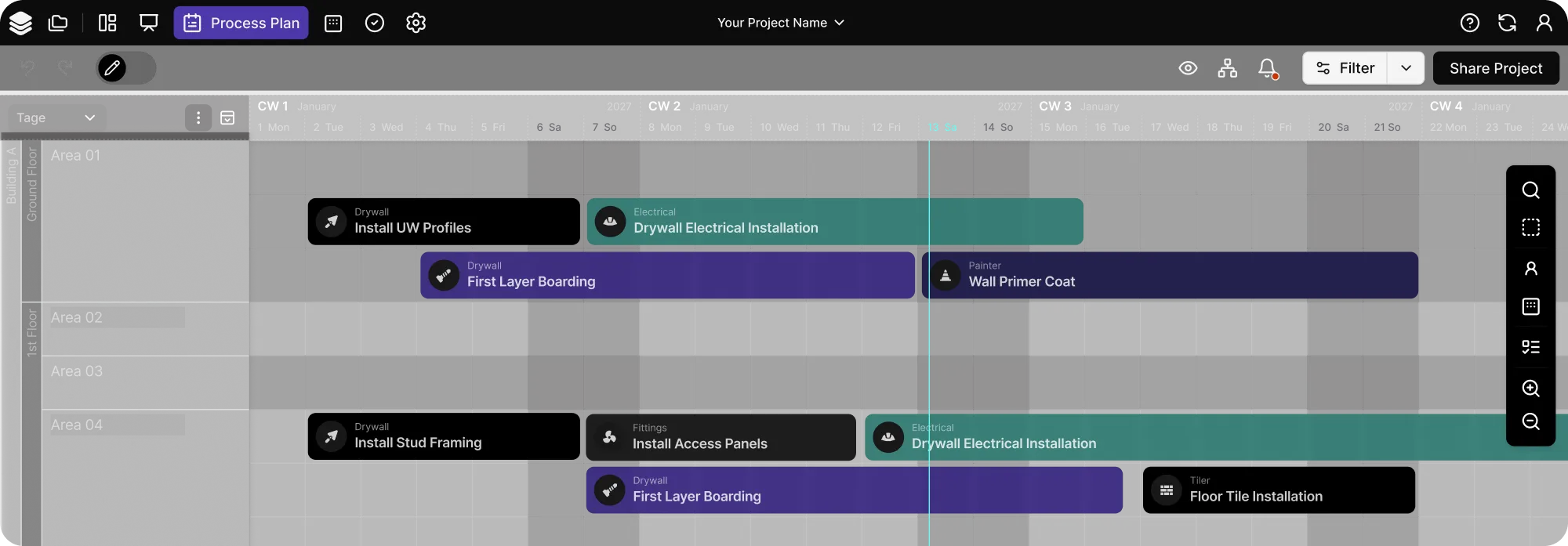
A construction schedule is usually managed in a Gantt chart or CPM plan, and progress tracking should tie work completed back to those milestones and dependencies. Good construction software links job site capture (photos, quantities, checklists) to the same work packages the schedule is built on, so planned vs. actual is visible without manual translation.
At that point, you have two practical needs:
- One source of truth: Many construction businesses start with Google Sheets. It works early, but it breaks at scale when updates speed up and multiple crews report in parallel.
- Cleaner handoffs: A central platform can improve communication by keeping progress updates, constraints, and decisions in one place—so office teams aren’t piecing together project status from scattered inputs.
Where Lcmd Fits in the Progress Tracking Loop
Lcmd is an integrated lean construction scheduling and control platform that connects short-term planning to measurable progress. It gives progress tracking a structure that still holds when plans change.
It ties Last Planner commitments and constraint removal to the same trackable work packages used in the schedule. Field proof from site capture—photos, checklists, quantities, and inspections/approvals where required—feeds directly into real-time progress tracking for office teams. Variance shows up early, while resequencing and constraint removal still make a difference.
{{cta}}
That’s where cost exposure stays manageable. In a construction company workflow, lcmd turns early variance into early correction, which means:
- Reduced rework
- Reduced waiting
- Fewer remobilizations
- Fewer “surprise” schedule impacts that turn into premium time and claims
Progress reporting stays lean because it’s a byproduct of execution, not a separate task.
Conclusion
Progress tracking sets the tempo of a project. When the reporting period is predictable and the input is proof-based, teams stop debating status and start managing flow.
Over time, the same structure becomes the way a project learns: constraints surface earlier, handoffs get cleaner, and estimates get sharper because the data stays comparable week to week.
To keep progress reporting consistent across projects, adopt the loop and the template as the default. This is what makes progress tracking scalable.