

Share this article:
.svg)


.svg)
.svg)

Key Takeaways from this article
The best construction project management software in 2026 connects planning, scheduling, field coordination, document management, and project control without forcing teams to manage each workflow in a separate tool.
- Construction teams need software that reflects how projects actually run: across trades, zones, dependencies, handoffs, constraints, and changing site conditions.
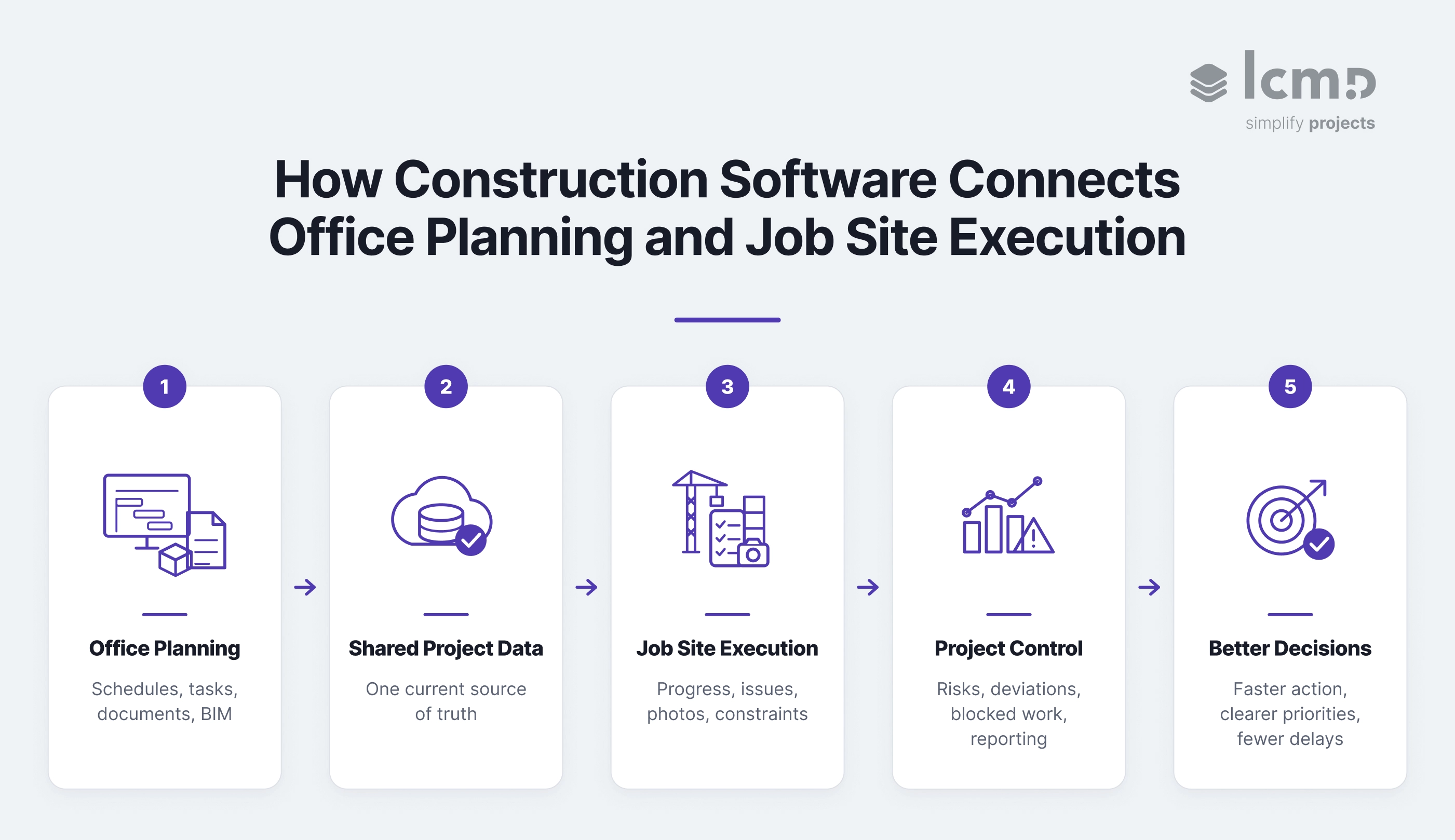
- Strong project management tools connect office planning with job site execution, so schedules, tasks, progress updates, and responsibilities stay aligned.
- Mobile access and visual planning are critical because field teams need fast, usable information during daily coordination, not only in office meetings.
- BIM integration, scheduling compatibility, and clean data exchange help reduce information gaps between design, planning, execution, and reporting.
- For lean construction, takt planning, and execution control, purpose-built construction planning software can offer more operational depth than broad project management platforms.
In my two decades overseeing construction projects, I've seen how the right tools can prevent all-too-common communication breakdowns. Last week, I sat in on a project review where three different teams were working from three different versions of the schedule.
Sound familiar? It's scenarios like these that make us ask: What does construction project management really need in 2026?
The Evolution of Construction Management Tools
The construction industry has moved beyond simple task tracking. Today’s construction project management software needs to transform how teams plan, coordinate, and execute work. It can turn fragmented construction teams into a cohesive unit, and chaotic progress into a well-oiled machine.
But with dozens of options available, how do you determine which software truly serves the unique demands of the construction industry?
Let's define what truly matters when deadlines are tight and stakeholders are demanding results.
Why Construction Demands Specialized Solutions
Construction industry 's needs are unique. Period.
Think about it. When was the last time your projects went exactly as planned? Between juggling contractors, battling the tasks and racing against time, we're not just pushing papers – we're building real structures against real deadlines.
The right software isn't about fancy features. It's about solving these core challenges without creating new ones.
In our industry, the best tool is the one you'll actually use when coordinating construction teams and the clock is ticking.
Key Features That Drive Construction Project Management Success
In our line of work, gut instinct and experience are invaluable. But let's face it: in construction, if you're not ahead, you're behind. So how do top-tier software solutions actually move the needle?
The most effective construction management software elevates your entire approach to project execution.
1. Flexibility in project scheduling that doesn't compromise control
Static reports and weekly updates are relics of the past. Today's advanced software offers real-time insights that predict and shape progress. This level of foresight turns reactive management into proactive leadership.
Spot that supply delay? Reallocate resources instantly. That's not just tracking—that's steering.
2. Real-time project progress updates that don't drown us in data
Remember the endless cycle of voicemails and missed calls with contractors and clients?
Real time communication is the cornerstone of successful projects. Modern tools create a unified platform where all stakeholders—from project managers to specialty contractors—access the same up-to-date information.
No more "he said, she said"—just clear, actionable facts that keep your construction teams aligned.
3. Document management and collaboration tools that work as well on-site as they do in the office
In construction, surprises cost money. Comprehensive project management software provides a bird's-eye view of your entire operation. Budget creep? Schedule conflicts? Spot them early, tackle them head-on.
With the right overview software, we're not just putting out fires anymore. We're preventing them.
Bottom line: In a world where every minute counts, powerful management software propels your projects forward. And in this business, that's everything.
Beyond Essential Features of Project Management Software - What Really Matters
When selecting project management software, asking the right questions can make all the difference. Let's focus on what truly matters for construction professionals:
Scalability and flexibility for different project sizes
- Can your software handle both a small renovation and a large commercial construction project?
Look for solutions that adapt to your project scope without compromising efficiency. The best construction planning software grows with your business.
Integration capabilities with industry-standard construction software
- Will the software play nice with your existing tools? The last thing you need is a digital island.
Aim for software that can sync with your current ecosystem, from accounting software to BIM.
Prioritize solutions offering easy data exchange, like XML exports for MS Project, and integration with 3D modeling for comprehensive project visualization.
Effective integration can transform your project dashboard into a comprehensive command center.
User-friendly interface for diverse construction teams
- Is it intuitive for everyone from your tech-savvy project manager to your field team?
The most effective construction project management software bridges technological gaps, ensuring smooth adoption across your entire construction team.
Field-ready features: Mobile solutions for Project Managers
- Does it perform on the job site as well as in the office?
Look for robust mobile capabilities that allow instant access to project information, task management, and document management from anywhere.
On-site accessibility for project managers keeps your projects moving forward, even when you're not at your desk.
Construction Project Management Software: A Comprehensive Comparison for Project Managers
As we've seen, the ideal top project management software for the construction industry is forward-thinking and adaptable. It fits your current needs and anticipates your future ones. Now, let's put theory into practice.
Which project management software truly offers the greater value for your construction business?
Visual Process Management: From Planning to Execution
The Power of Visual Tools in Construction
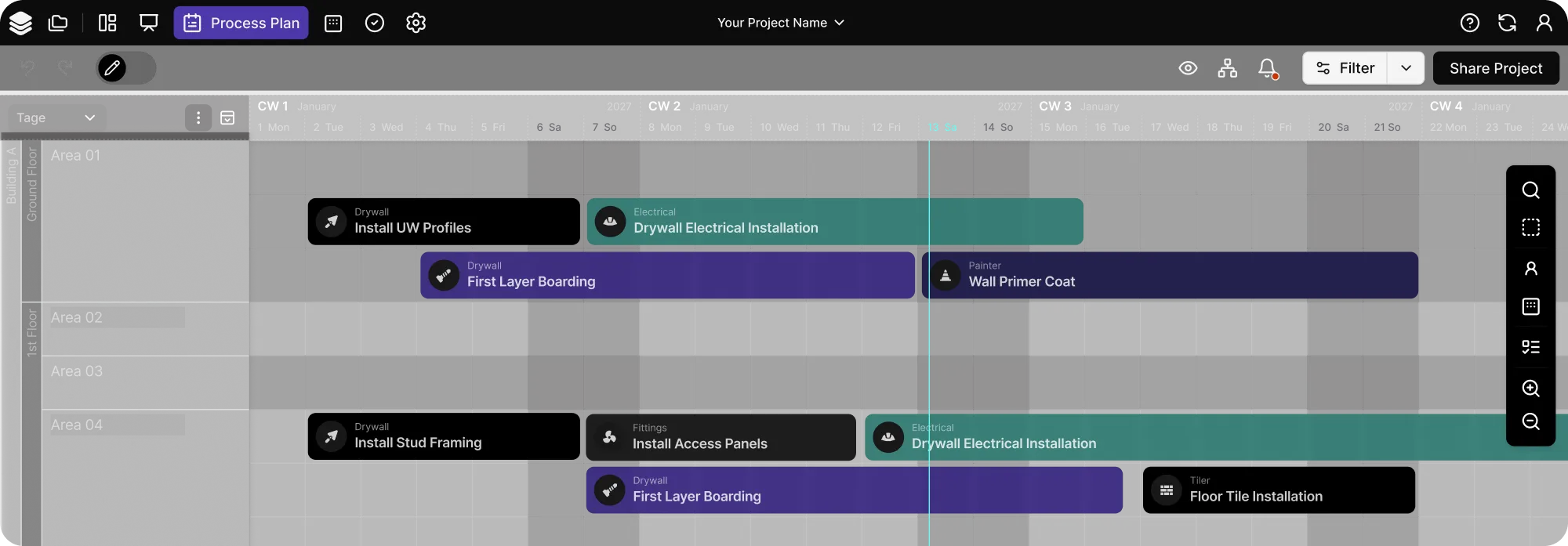
The real test of any visual tool is its practical application. In construction, effective visual process management must transform complex scheduling data into actionable insights. It should highlight:
- Critical paths
- Task dependencies
- Resource allocation at a glance
This enables quick decision-making without overwhelming the team.
Comparing Visual Project Management Software Features
Complex 3D Visualization in Construction
Visual management tools have evolved in different directions. Specter Automation, for instance, leverages sophisticated 3D modeling capabilities for process visualization. This approach offers impressive spatial understanding, particularly valuable for commercial construction.
Project managers can visualize how different trades interact within the physical space, which helps prevent potential conflicts. Their detailed analysis capabilities excel in later project phases, providing deep insights once construction is underway.
Challenges of Visual Complexity
However, in job site operations, I've found that highly detailed 3D visualizations can sometimes overcomplicate routine task management.
During a recent high-rise project, the site supervisor needed to quickly reassign tasks due to material delivery delays. Plus, waiting until construction is underway for detailed analysis can mean missing early optimization opportunities.
Effective Visual Project Management
Lcmd implements a more streamlined methodology, emphasizing clarity in process visualization. Its interface balances detail with accessibility, while enabling data-driven decisions from day one.
For example, when managing multiple trade contractors, the visual workflow helps quickly identify scheduling conflicts and resource overlaps. The integrated analysis tools transform this visual data into actionable insights, helping teams optimize processes before issues impact the schedule.
Balancing Project Management Features for Optimal Results
The most effective solution aligns with your team's daily workflow, enhancing rather than complicating the process.
When evaluating visual management tools, consider:
- How quickly can field teams grasp and act on the information?
- Does the visualization support both high-level planning and day-to-day execution?
- Can stakeholders at all levels easily interpret and use the visual data?
In practice, the best visual process management isn't about the most sophisticated graphics—it should turn complex project data into clear, actionable insights that drive project execution forward.
Integration & Data Exchange: Breaking Down Silos
When project planning systems don't communicate effectively, critical information gets trapped, leading to costly miscommunications and delays.
Over the years, I've seen projects derailed simply because different construction teams couldn't share their data efficiently. Project management software must play well with other tools in today's multi-tool environment.
Evaluating Software Integration for Efficient Project Workflows
Software providers have distinct philosophies about integration.
Basic Document Management Integration
Koppla emphasizes basic file handling, offering robust functionality for PDF and Excel outputs. This makes data exchange straightforward and accessible for different stakeholders.
However, its limitation becomes apparent with more complex integrations—notably, the absence of MS Project import functionality, which they attribute to potential data integrity concerns.
Comprehensive Project Information Exchange
Lcmd delivers comprehensive integration capabilities. Its MS Project XML export ensures data integrity, while its compatibility with 3D modeling systems enhances spatial planning.
During a recent multi-phase construction, this meant construction teams could seamlessly move between detailed project scheduling and spatial planning, maintaining data consistency throughout.
The additional support for Last Planner System integration supports lean planning routines across different areas of project management.
Project Management Features that Drive Collaboration
When evaluating integration capabilities, consider these critical factors:
- How well does the solution preserve data relationships across platforms?
- Can it handle both simple exports and complex system integrations?
- Does it support your team's existing workflows and tools?
In my experience, the ability to exchange accurate, detailed project data in real time can prevent countless headaches down the line. The right solution should improve collaboration, not complicate it.
Flexibility in Project Implementation
In construction, no two days are the same.
While standardized processes form the backbone of project management, success often depends on how quickly you can adapt to unexpected changes. The ideal construction management software must balance structure with flexibility—too rigid, and you can't handle surprises; too flexible, and you lose efficiency.
Comparing Construction Management Software Flexibility
Different software approaches this challenge in unique ways.
Standard Process Management Software
Takt.ing specializes in standardized processes, using a comprehensive standards database. This works well for construction firms with consistent project types, streamlining their operations through established standards. However, when unique project demands arise, the complexity of the system can limit quick adaptations.
Adaptive Task Management Software
Lcmd distinguishes itself through flexibility, prioritizing adaptability through features like trade-specific filtering. During a complex construction project, this allows managers to quickly reorganize tasks when unexpected structural issues emerged, keeping subcontractors coordinated despite the changes.
Balancing Project Management Structure and Flexibility
When selecting software, consider:
- Can it handle both standard processes and unexpected changes?
- How quickly can teams adapt plans when surprises occur?
- Does the structure support rather than hinder adaptability?
To manage projects you don't need only to deal with routine tasks; you have to navigate surprises and keep project progress on track to success. The most effective software solution isn't the most standardized or the most flexible—it's the one that gives you structure when you need it and freedom when you don't.
User Experience: From Office to Job Site
Even the best software in the world is useless if your construction team can't or won't use it. In construction, software needs to serve users in two distinct environments: the controlled setting of the office and the dynamic reality of the job site.
An intuitive design can significantly impact how quickly and effectively a project management tool is adopted across your teams. It should feel natural for everyone.
Evaluating User Adoption in Construction Management Software
In construction management software, user interface design varies widely, with significant implications for adoption and efficiency. Two contrasting approaches illustrate this diversity:
Complex Project Management Systems
Takting's interface is built around a comprehensive database of standards. This can optimize task management for organizations with well-established processes. It provides solid structure for office-based planning and standardization.
However, in practice, project teams often struggle with the steep learning curve, particularly when accessing and updating information from the field.
Intuitive Construction Management Solutions
Lcmd features a more intuitive design that prioritizes visual clarity and ease of use. I've found this very valuable when switching between office planning and field operations and also crucial for rapid adoption across diverse construction teams.
For instance, during a recent multi-story renovation project, site supervisors could easily access and update project information on their mobile devices, maintaining real-time communication with the office team. This allowed more efficient project execution and improved task management.
Bridging the Office-Field Gap
The key to effective user experience in construction project management software lies in how seamlessly it bridges the office-field divide.
When selecting software, consider:
- How quickly can new team members become productive with the software?
- Does the interface remain practical in both office and field environments?
- Can users maintain efficient workflow regardless of their location?
The best interface, in my experience, is one that becomes invisible—allowing team members to focus on the project rather than wrestling with the tool itself.
Cross-Project Functionality
One of the most valuable assets in construction management is experience. Yet translating lessons learned from one project to another remains a persistent challenge. While every project is unique, the ability to leverage past insights can significantly impact future success.
Comparing Project Management Knowledge Transfer
Template-Driven Project Tool
Koppla offers a robust system of cross-project templates, which can be highly effective for standardizing processes across similar projects. However, this approach can sometimes lead to a 'copy-paste' mentality that doesn't account for project-specific nuances.
Flexible Project Planning Approach
Lcmd takes a different approach, focusing on tools for process analysis and optimization. Rather than relying on pre-built templates, it enables teams to build a flexible knowledge base. When adapting warehouse construction techniques for a unique industrial project, this allowed teams to apply relevant past experiences while maintaining the flexibility to address specific project requirements.
Building on Experience Across Projects
In my view, the ideal solution strikes a balance between standardization and customization. It should facilitate knowledge transfer without stifling the creativity and adaptability that complex projects often require.
So, when evaluating cross-project capabilities, consider:
- How does the solution balance standardization with customization?
- Can teams easily adapt past experiences to new challenges?
- Does knowledge transfer enhance rather than restrict creativity?
The most effective approach isn't about rigid replication—it's about smart adaptation of proven solutions to new challenges.
{{cta}}
Future Trends in Construction Planning Software
The construction industry's evolution from basic task tracking to comprehensive management platforms signals an even more transformative future. As project management software continues to mature, three pivotal trends are emerging:
Intelligent Risk Prevention
Next-generation construction software will shift from tracking issues to preventing them, using pattern recognition across multiple projects to flag potential schedule conflicts and resource bottlenecks before they occur.
Autonomous Coordination
AI-driven systems will take on routine coordination tasks, automatically adjusting schedules and resources based on real-time progress, weather conditions, and supply chain updates, freeing construction managers to focus on strategic decisions.
Contextual Knowledge Networks
Moving beyond simple knowledge sharing, future platforms will create dynamic networks of project insights, automatically connecting relevant experiences and solutions to current challenges based on specific project contexts and conditions.
These advancements suggest a future where project management becomes even more intuitive, proactive, and deeply integrated into the construction process itself. Management software will transform into dynamic advisory tools that grow smarter with each project.
Best Software for Construction Management and Planning in 2026
In the complexity of today's construction projects, the difference between success and chaos often hinges on a single decision: choosing the right project management software. But this choice extends far beyond feature lists and technical specifications.
The right tools amplify your capabilities and sharpen your edge.
When construction teams focus on building rather than battling their tools, when construction managers prevent issues rather than chase them, and when knowledge flows seamlessly across projects—that's when technology truly transforms construction management.
Success stems from management software that seamlessly integrates into daily operations, transforming the impossible into achievable reality.
In an industry where every minute impacts profit and safety, choosing the right project management tools becomes your decisive strategic advantage.
FAQs About Construction Project Management Software
What is construction project management software?
Construction project management software helps teams plan, coordinate, monitor, and control construction projects. It brings schedules, tasks, documents, field updates, communication, reporting, and progress tracking into one connected workflow.
What should construction companies look for in project management software?
Construction companies should look for software that supports planning, field coordination, scheduling, document control, mobile access, integrations, reporting, and project control. The right tool should reflect how construction teams actually work across office teams, site teams, trades, stakeholders, and changing project conditions.
Why is generic project management software often not enough for construction?
Generic project management software can support basic task tracking and communication, but construction projects involve trades, zones, dependencies, constraints, handoffs, site updates, and changing schedules. Construction-specific software is better suited to these operational realities.
How does BIM integration help construction project management?
BIM integration connects model information with planning and execution. It helps teams understand spatial relationships, identify conflicts earlier, and link design information with project coordination, scheduling, and progress tracking.
What should a construction project management mobile app support?
A good construction project management mobile app should allow field teams to view tasks, log progress, flag constraints, upload photos, document issues, and communicate with the office from the job site. Simple mobile access is often what determines whether site teams actually use the software in daily operations.
What is the best construction project management software for lean construction?
The best construction project management software for lean construction should support takt planning, pull planning, lookahead planning, field coordination, constraint management, and continuous project control. Teams focused on lean execution usually need more than document management or generic task tracking.