

Share this article:
.svg)


.svg)
.svg)

Key Takeaways from this article
- A critical path holds its status only until the next schedule update proves otherwise.
- Float can remain untouched for weeks, then disappear through a single disruption that exceeds the available margin.
- A network can be mathematically flawless and still assume crews, equipment, materials, or workspace that the project cannot supply.
- Shrinking total float can reveal rising schedule exposure before the finish date confirms the consequence.
- A CPM schedule earns its value when real disruption tests the logic, data, and recovery choices built into it.
Every construction schedule has one chain of work that ultimately decides the finish date.
In the late 1950s, engineers at the chemical company DuPont wanted a better way to find it. Their goal was to shorten complex maintenance shutdowns at the company’s Louisville Works plant. By March 1959, its Louisville Works had cut average shutdown time from 125 hours to 93.
Their method identified the sequence of activities controlling the earliest possible finish. It became known as the critical path method (CPM), and its logic still underpins construction schedules today.
The first delay is where a CPM schedule faces its real test. Float is consumed, another sequence moves closer to critical, and the path controlling project completion can change. This guide follows one construction schedule through a two-day trade delay to the moment its critical path moves.
What Is CPM Scheduling for Construction?
CPM scheduling for construction is a network-based technique that maps activity durations and logic relationships, then calculates earliest and latest start and finish dates and total float to identify the sequence controlling the earliest possible completion date. That sequence is the critical path. CPM in construction remains useful during execution when actual progress and remaining durations are updated, showing when another path begins controlling completion.
5 Factors That Shape the Critical Path
Every critical path depends on what goes into it before the calculation runs. CPM needs five kinds of project information to turn construction logic into dates, float, and the sequence controlling completion.
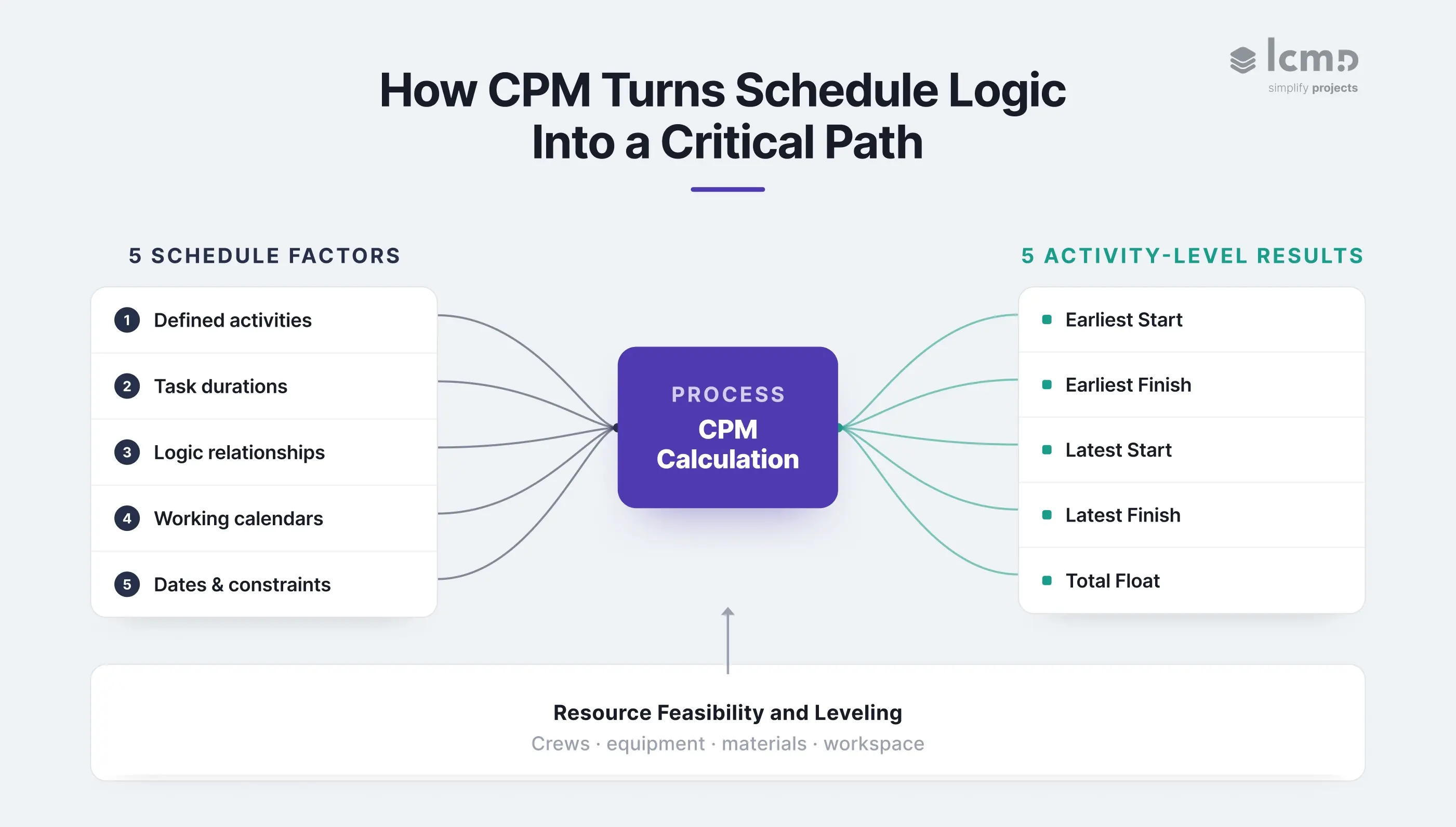
- Defined activities. The work breakdown structure translates scope into construction activities with clear start and finish points.
- Accurate task durations. Task durations should reflect quantities, crew productivity, working conditions, and reliable historical data.
- Logic relationships. Task dependencies connect dependent tasks and define what must finish, start, or overlap before the next activity can proceed.
- Working calendars. Shifts, workweeks, holidays, and restricted hours determine when each activity can take place.
- Dates and justified constraints. The project start or data date, access dates, approvals, deliveries, milestones, and contractual limits shape the calculation.
What the Critical Path Method Produces From Five Schedule Inputs
From these inputs, CPM calculates five activity-level results:
- Earliest Start
- Earliest Finish
- Latest Start
- Latest Finish
- Total Float
In the unconstrained network used in the worked example below, the project finish is the Earliest Finish of the final activity. The critical path is traced through the connected activities with zero Total Float. Both are read from the same calculated values.
The calculation still has to survive site reality. Resource allocation tests whether the available crews, equipment, materials, and workspace can support the sequence. Resource leveling can move activities and change the path controlling completion.
How CPM Calculates the Critical Path: A Construction Example
The critical path method exists to untangle situations too complex to eyeball, which is exactly why project managers rely on it. A 13-activity network with three parallel trades and a four-step finishing chain is where CPM earns its keep.
Those activities now put the five schedule factors from the previous chapter to work. Each one has a defined scope and task duration. Finish-to-start relationships connect the network, every activity follows the same five-day working calendar, and Day 0 sets the starting reference. No lags or imposed date constraints are applied.
Once CPM runs the network, those same five activity-level results appear for every task. They show where the floor finishes and which connected activities have no room to slip. Every result comes directly from the activity logic, durations, and shared calendar.
Activity Network: 13 Activities Across 6 Stages
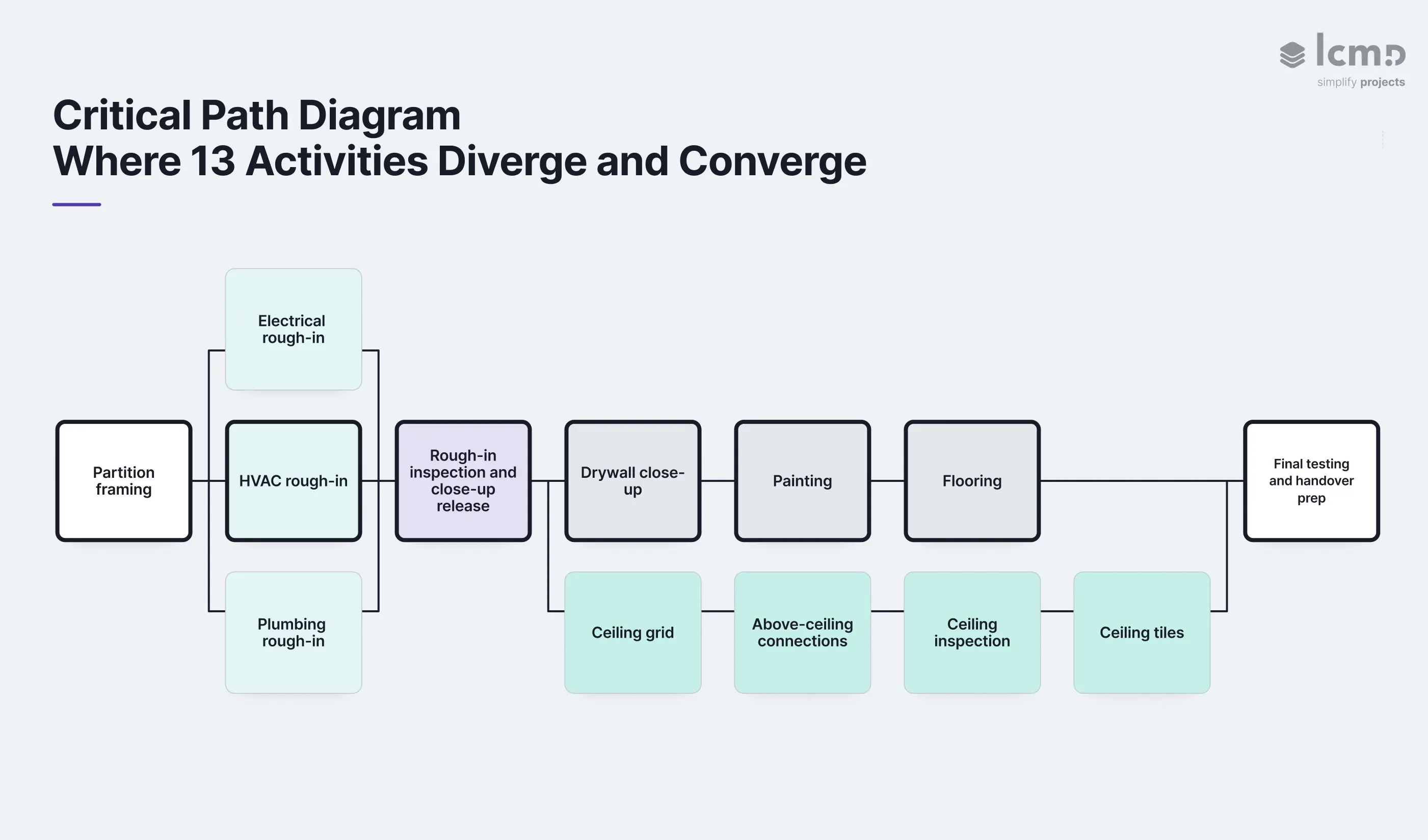
Before CPM can calculate the critical path, the schedule has to organize tasks by sequence and duration. This floor holds thirteen individual activities, grouped here into six connected stages so the sequence stays readable:
- Partition framing, 4 days
- Parallel rough-in: electrical (5 days), HVAC (6 days), plumbing (4 days)
- Rough-in inspection and close-up release, 1 day
- Drywall path: drywall close-up (5 days), painting (4 days), flooring (3 days)
- Ceiling path: ceiling grid (3 days), above-ceiling connections (5 days), ceiling inspection (1 day), ceiling tiles (2 days)
- Final testing and handover preparation, 3 days
Task dependencies hold it together: all three rough-in trades must finish before rough-in inspection and close-up release can begin. The drywall and ceiling paths then proceed separately toward final testing, which waits for both.
Forward Pass and Backward Pass: Every Activity's Dates
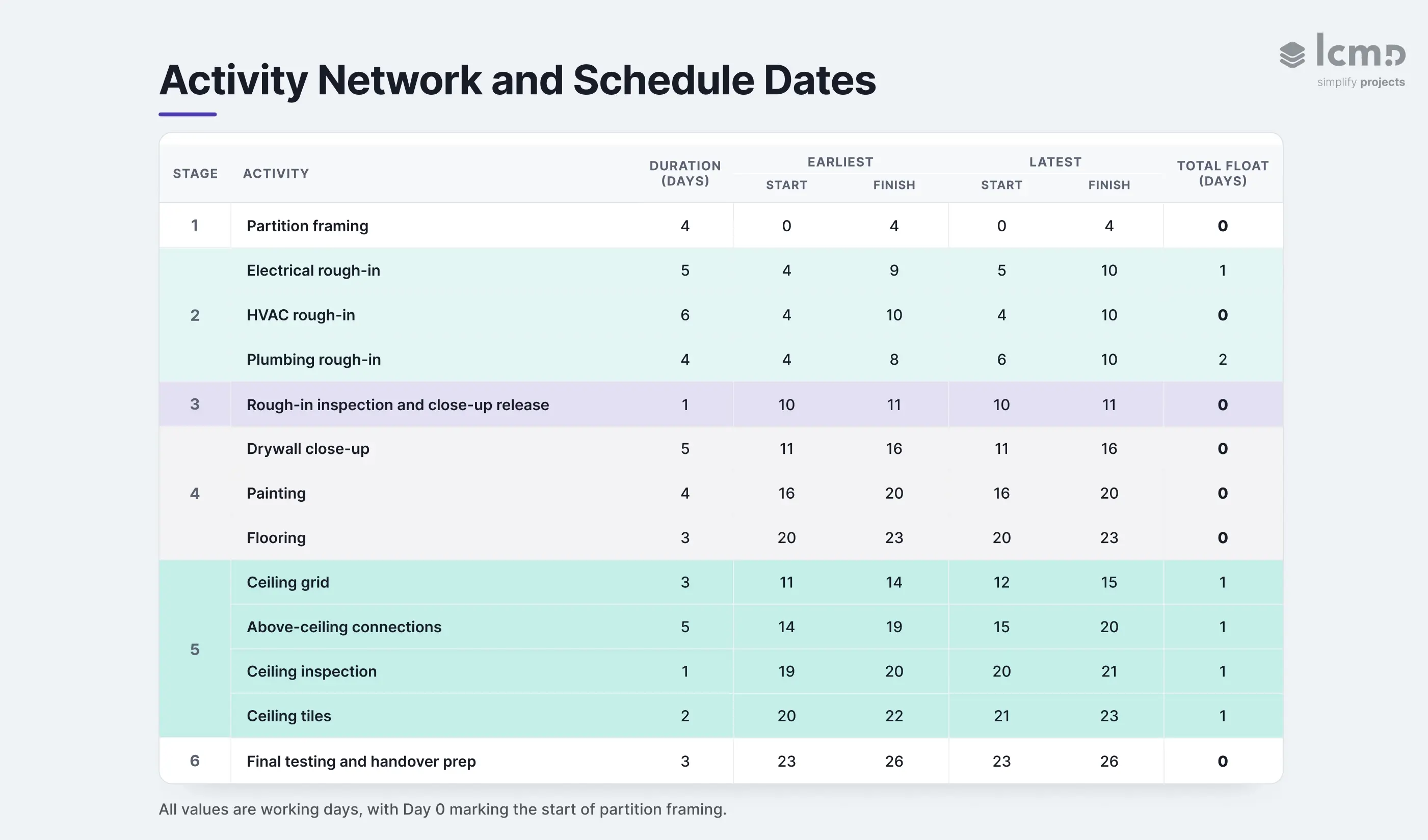
The forward pass assigns each activity the earliest start and finish its predecessors allow, moving through the network from Day 0. At a merge point, the next activity waits for the latest-finishing predecessor. Rough-in inspection and close-up release therefore waits for HVAC and starts on Day 10. Final testing waits for the drywall path and starts on Day 23, even though the ceiling path finishes on Day 22.
The backward pass starts at the Day 26 handover date and works toward the project start. It determines the latest each activity can start and finish without moving completion. Together, the two passes produce the five activity-level results shown below.
All values are working days, with Day 0 marking the start of partition framing.
Total Float: Where the Schedule Has Room
Total float is the gap between an activity's earliest and latest start. It tells the project team exactly where these thirteen activities have room to slip and where they don't, sorting them into three tiers:
- Zero float: partition framing, HVAC rough-in, rough-in inspection and close-up release, drywall close-up, painting, flooring, final testing and handover prep
- One day: electrical rough-in, and every activity in the ceiling path (stage 5)
- Two days: plumbing rough-in
Critical Path: Which Sequence Controls Handover
These zero-float activities identify the critical path: partition framing, HVAC rough-in, rough-in inspection and close-up release, drywall close-up, painting, flooring, final testing and handover preparation. This sequence controls the floor's 26-working-day project duration, and none of its activities have any room left to slip. A delay to any one of them moves handover unless time is recovered elsewhere.
These critical path activities are where that exposure concentrates. The ceiling path remains near-critical, its single day of float the exact margin the next two-day trade delay will consume. None of this yet checks whether the crews and materials exist to run either path.
The next section follows that delay through the updated network and shows when the path controlling handover changes.
How Delays Consume Float and Shift the Critical Path
Day 12 opens with the Day 26 handover still intact. Partition framing, all three rough-in trades, and rough-in inspection and close-up release are complete. Drywall close-up and ceiling grid installation are underway. Then a resource constraint pulls the ceiling grid crew off the floor for two working days.
Day 12: Actual Progress Changes the Forecast
At each data date, project managers track project progress by replacing planned assumptions with actual progress and updated remaining durations. The ceiling grid was scheduled from Day 11 to Day 14. By Day 12, one day is complete and two working days remain.
The interruption changes that forecast. Task dependencies, the working calendar, and downstream durations stay unchanged. Only the ceiling grid has new information, but the full network gets recalculated around it, carrying its finish from Day 14 to Day 16.
One Day of Float, Two Days of Delay
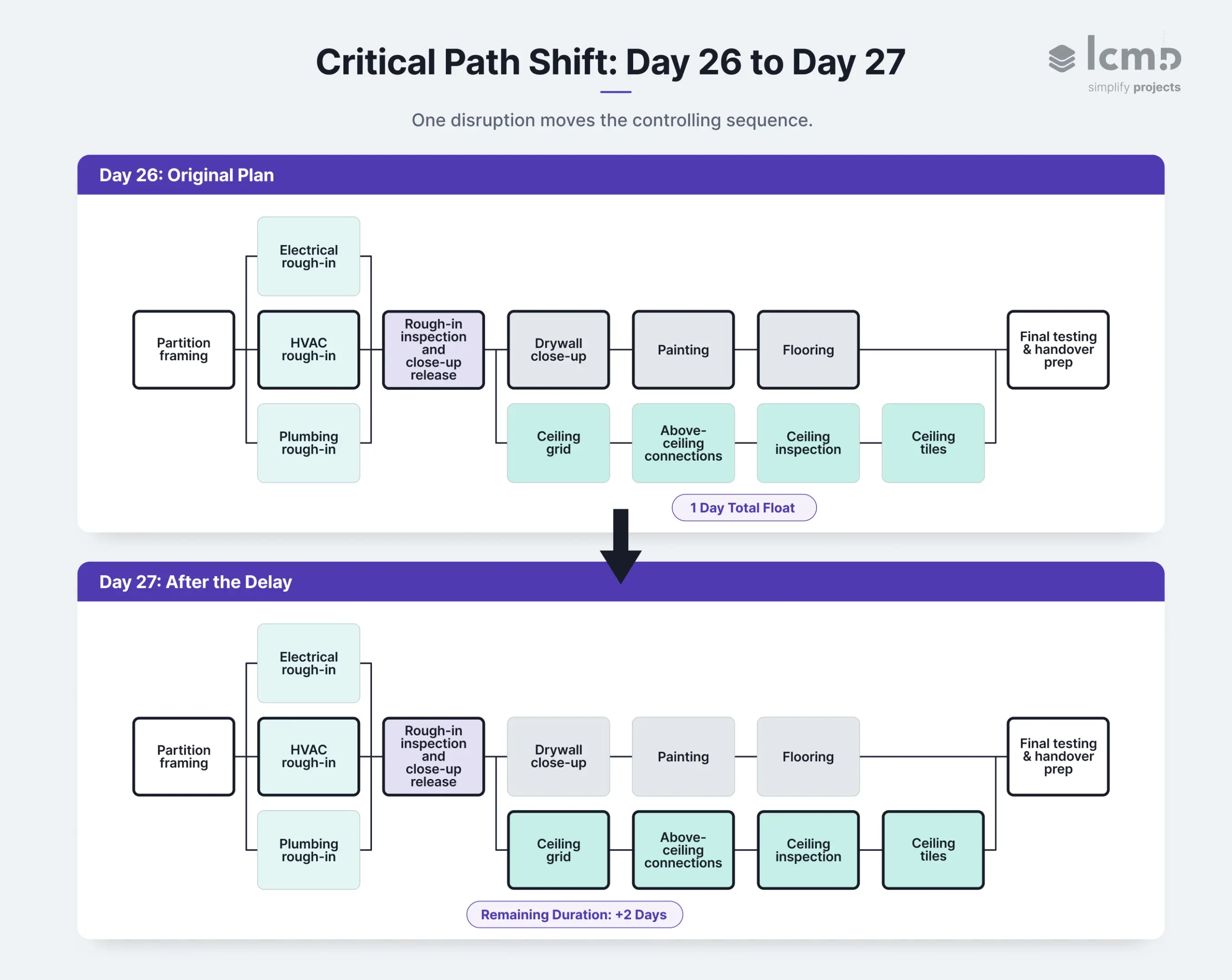
Before the update, the ceiling path finished Day 22 and carried one day of total float. The drywall path finished Day 23, letting final testing and handover preparation run Day 23 to Day 26.
The revised ceiling grid finish moves every successor on that path:
- Above-ceiling connections: Day 14-19 becomes Day 16-21
- Ceiling inspection: Day 19-20 becomes Day 21-22
- Ceiling tiles: Day 20-22 becomes Day 22-24
- Final testing and handover preparation: Day 23-26 becomes Day 24-27
The first lost day uses up the ceiling path's existing float. The second carries it one day past what the schedule could absorb, and handover moves from Day 26 to Day 27.
Day 27: The Ceiling Path Takes Control
After recalculation, the connected zero-float sequence runs through partition framing, HVAC rough-in, rough-in inspection and close-up release, ceiling grid, above-ceiling connections, ceiling inspection, ceiling tiles, final testing and handover preparation.
This is what near-critical meant in the baseline schedule. The ceiling path sat just outside the controlling sequence, with a margin small enough for one disruption to reverse which finishing path controls handover. Final testing now waits until the ceiling path finishes on Day 24, one day after the drywall path finishes on Day 23. The formerly critical drywall path now carries one day of total float.
Any activity associated with the CPM schedule that is delayed long enough can eventually become critical, regardless of its original status.
AACE International, Recommended Practice 49R-06
Management Response: Protecting the New Critical Path
The recalculation helps project managers identify where intervention can still protect the handover date. First, verify the reported actual progress, confirm when the ceiling crew can return, and test recovery options against the updated network. From there, a project manager can examine whether:
- Another qualified crew can restore ceiling grid production
- Completed ceiling zones can release above-ceiling connections earlier
- Extra capacity can shorten a downstream activity
- The project team can adjust task sequences while keeping the work safe and buildable
Each option needs its own calculation before crews or equipment get committed. A recovery move that shortens one activity can expose different resource constraints, or shift control to another path.
Project managers plan the recovery from the updated schedule, communicate the Day 27 forecast, and track progress against the revised path at the next data date. The same update feeds the broader construction risk management process, keeping potential delays and remaining exposure visible.
If the disruption is later disputed, the contemporaneous update becomes a key project record for forensic schedule analysis. AACE RP 29R-03 treats that analysis as a distinct application of CPM principles, separate from ordinary project planning and control.
Where CPM Fits in Schedule Management
The Day 12 update also reveals where CPM sits in the wider construction scheduling system. At the master-schedule level, it carries the long-range logic of the construction project and shows that the ceiling path now controls handover. The rolling lookahead and weekly work plan are where teams should surface that crew conflict earlier, test readiness, and coordinate upcoming work. Construction schedule management keeps the master schedule, rolling lookahead, and weekly work plan connected.
Alongside these schedule levels, each method plays a distinct role in project planning:
- CPM keeps the controlling sequence visible in the project schedule.
- Program Evaluation and Review Technique (PERT) applies network logic when activity durations remain uncertain.
- Takt planning coordinates location-based trade flow.
- Last Planner System® turns near-term work into reliable commitments.
These methods establish the planning logic. Scheduling software determines how that logic is calculated, updated, and carried into execution.
CPM Scheduling Software: Connecting the Master Schedule to Site Progress
Most large CPM networks are calculated in dedicated scheduling software such as Primavera P6, MS Project, or Asta Powerproject. These tools run the same forward and backward passes used in the 13-activity example, only across hundreds or thousands of activities in a full construction project.
From CPM Calculation to Usable Schedule Information
Accurate calculation does not guarantee that project participants can interpret the output or act on it. Construction scheduling specialist Ronald J. Rider captured that limitation clearly:
The user is at the mercy of the CPM scheduling program in terms of how the output of the schedule data is presented.
His wider point is that the schedule analyst still has to organize critical and near-critical path data in a form project participants can understand.
Keeping the Master Schedule Connected to Site Progress
The same challenge appears between the office and the site. A valid CPM construction schedule loses operational value when field progress reaches it late, or when the short-term plan develops separately from the master logic. On one Lcmd data-center project in Abu Dhabi, teams updated Lcmd continuously while adjusting the P6 schedule weekly for client reporting, two tools following different rhythms within the same control process.
Lcmd connects with P6, MS Project, and Asta through data synchronization, reducing duplicate entry and keeping planning environments aligned. Progress, conflicts, and delays stay current in Lcmd while the formal master schedule follows the project's agreed update cadence.
For CPM construction project management, that connection keeps network logic close to execution. CPM scheduling software preserves the dependencies and float controlling completion. Field-facing project management software helps teams coordinate upcoming work, record verified progress, and prepare the next schedule update. Lcmd's construction planning features connect those layers while respecting each tool's own update rhythm.
{{cta}}
6 Common CPM Scheduling Mistakes in Construction and How to Correct Them
CPM reliability depends on the quality of schedule inputs and updates. These six errors show where construction management teams lose control and how to restore it.
- Poorly defined activities. Vague scope and unclear finishes weaken progress measurement. A verifiable activity has an explicit handoff and a clear completion point.
- Optimistic or stale remaining durations. Old assumptions distort project timelines. A reliable schedule carries actual progress and remaining work, refreshed at every data date directly from the site.
- Logic changed to hide delay. Rewritten relationships weaken the contemporaneous record. Schedule history stays intact when logic changes only alongside real shifts in site conditions or execution plans.
- Generic working calendars. Standard workweeks miss shifts, access restrictions, shutdowns, and trade availability. A calendar reflecting how each activity can actually proceed avoids that gap.
- Excessive hard constraints. Unjustified dates distort float and obscure the controlling sequence. Every hard constraint that survives review carries a documented reason, and only those constraints remain in the network.
- Invisible resource leveling. Crew, equipment, material, or workspace limits can move dates. A leveled schedule records those assumptions, documents the resulting date changes, and shows their effect on critical and near-critical paths. This protects project efficiency.
On complex projects, this discipline has to extend to critical path analysis of the near-critical paths sitting just outside it, exactly where this article's own ceiling path lived before one disruption moved it. The resulting schedule gives project stakeholders a defensible basis for decisions and keeps project success tied to current site reality.
Conclusion
A project can lose control before it loses time. The overall project duration may remain unchanged while float disappears, resource pressure builds, and another sequence moves closer to control.
This is the less visible side of CPM. Critical path tasks identify where exposure is concentrated today. Near-critical paths reveal where tomorrow's exposure is already forming. As those margins shrink, the schedule carries fewer credible ways to recover without disrupting another part of the work.
Connecting field updates to the master schedule in Lcmd keeps that kind of movement visible while a project manager still has several ways to respond.
Seen this way, the critical path represents the boundary between a schedule with choices and a schedule that has begun making the decision for the project team.
FAQs
Who Developed the Critical Path Method, and Why?
The critical path method was developed in the late 1950s by Morgan R. Walker of DuPont and James E. Kelley Jr. of Remington Rand. It improved planning for complex industrial shutdowns by identifying the sequence controlling the earliest possible finish and showing where delay would extend the outage.
Can the Critical Path Change During Construction?
The critical path can change when updated actual progress, remaining durations, task relationships, or calendars alter the network calculation. A near-critical sequence can take control after its float is consumed. A two-day crew interruption can shift the controlling path and move the forecast completion date.
How Does CPM Differ From a Gantt Chart?
A Gantt chart visualizes activities as bars across a timeline. CPM uses durations and dependencies to calculate the key elements that identify the controlling sequence: early dates, late dates, and total float. Gantt views can show links and critical activities. Network diagrams expose merge points and parallel paths more clearly.
How Does Line of Balance Differ From CPM?
Line of Balance plans repetitive work by location, production rate, and crew flow. CPM models dependencies and float across the full project network. Line of Balance suits repeated floors, units, or linear sections. Construction project managers often combine both methods to connect location-based flow with milestones and completion logic.
How Often Should a CPM Schedule Be Updated?
A CPM schedule should be updated at every agreed data date and whenever site conditions materially change the forecast. The project team records starts and finishes, updates remaining durations, and verifies logic, calendars, and constraints. Reliable construction progress tracking provides current field evidence for each recalculation.